Share travel options with employees and guests, right from ITILITE




Booking travel on someone else’s behalf starts with one question. What does the traveler want? And this question gets complicated when you are trying to get answers from someone who isn’t your employee. It could be a guest traveler or a candidate coming in for an interview.
Booking travel for non-employees has always been a grey area in corporate travel. What policies apply? What happens to airline credits? What if a flight gets cancelled or they book outside the policy? Who collects their details? Yes, there can be an endless list of problems.
And that’s where SHARE comes into the picture.
ITILITE Share, a new Chrome extension, lets travel bookers ask it from the results page and get the answer tied to the trip. It replaces screenshots, email threads and re-typing.
- Options traveled as screenshots: Travel bookers copied flights, hotels and cars from the results page into emails or chat messages, then waited for a reply.
- Choices were re-entered by hand: Once the traveler answered, the travel booker typed their pick back into the booking.
- Notes got lost: Seat and breakfast preferences stayed buried in the thread, and nothing linked the reply to the trip being booked.
- Fares moved while travel bookers waited: Prices change and availability shrinks, so a slow reply could mean missing the best option.
What ITILITE Built
Travel bookers can now share travel options with one or more travelers straight from ITILITE’s results page, and travelers reply from a single page.
- A floating widget appears automatically on flight, hotel and car results pages. Hover over an option, click Share, and keep adding options across every leg of the trip
- The travel bookers send the options by email to one or more travelers. Each gets one page with all the options, grouped by booking, with prices and availability as of the time of sharing
- The page opens from the email with no login or ITILITE account, so it works for employees and for guests outside your company
- The traveler selects one option per leg, adds a note to any option and an overall note, and submits. If nothing works, they can ask for different options and describe what they want
- The travel bookers gets an email for each submission with the traveler’s choices and notes, and a Complete booking on ITILITE button that opens the trip’s results page
- A View all preferences page shows every option shared and every response so far. Responses add up and never replace earlier ones
- To act on a “different options” request, the travel booker adds or removes options and shares again. The traveler gets a new email, and the same link shows the latest options
The extension works on desktop browsers built on Chromium, tested on Chrome and Arc. It is live on the Chrome Web Store (search “itilite”) and available in all countries. It activates automatically on any trip’s results page on ITILITE, and only the travel travel bookers need it. The help center article covers how to install and use it.
How to Use ITILITE Share
Four steps take you from the results page to the traveler’s choice. Install the Chrome extension first, and it activates on its own on any trip’s results page.
1. Add options as you browse
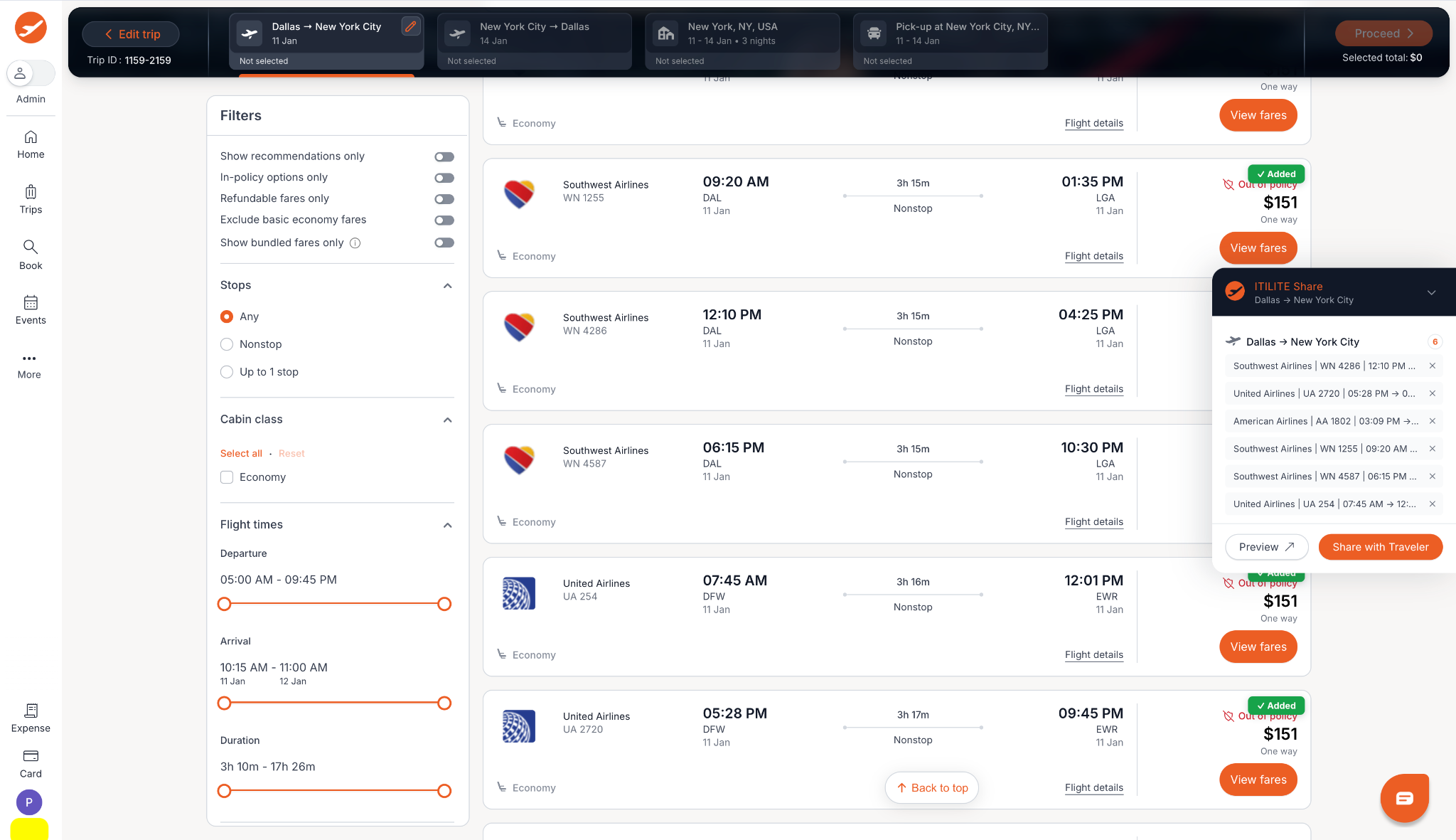
On any flight, hotel or car results page, hover over an option and click Share. The floating widget collects everything you add, across all legs of the trip.
Alt text: ITILITE flight results page with the ITILITE Share widget listing six flights added for Dallas to New York City, with Preview and Share with Traveler buttons
2. Send to the traveler
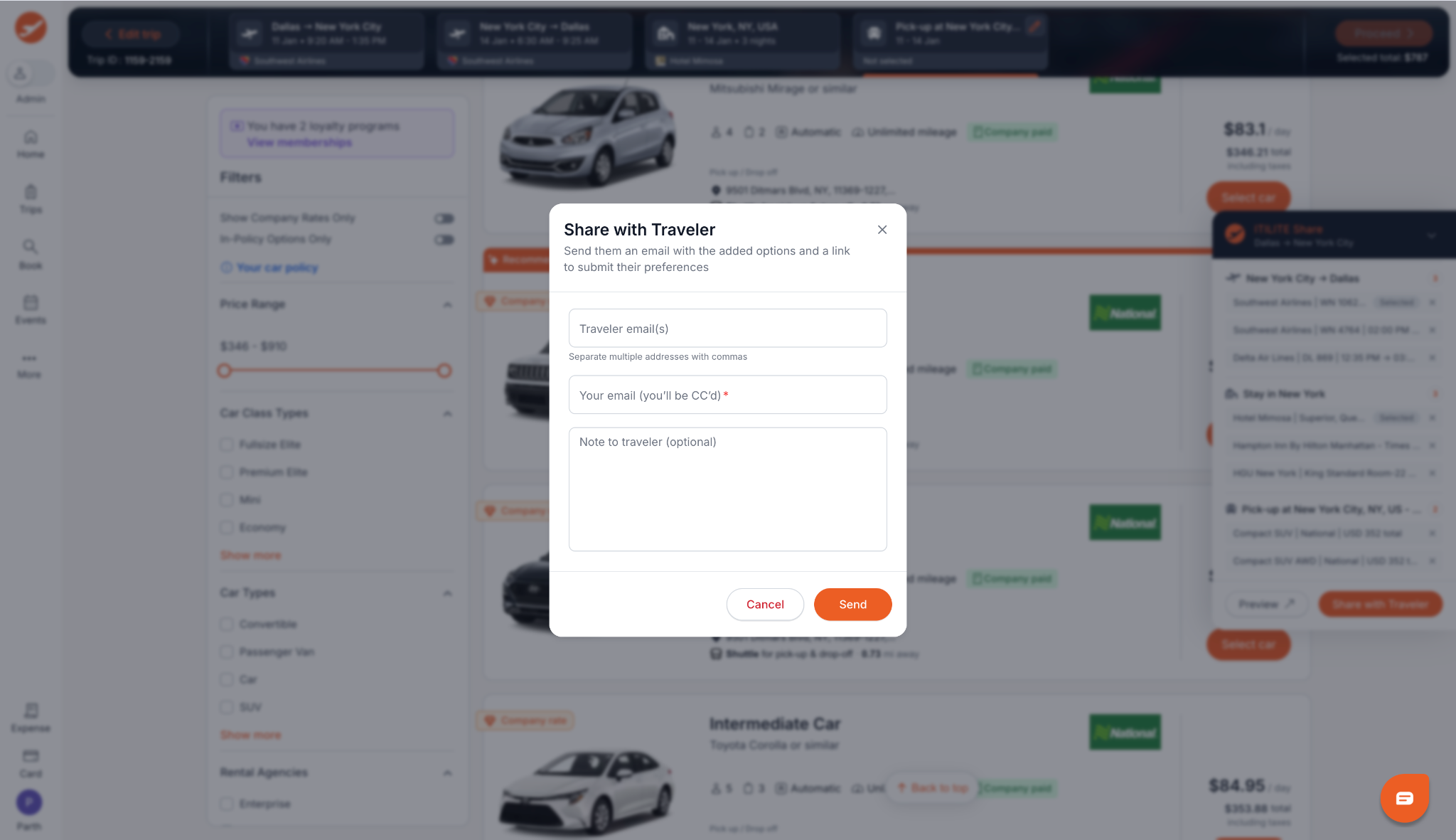
When your options are ready, click Share with Traveler. Add the traveler’s email (separate several with commas), your own email, and an optional note.
Alt text: Share with Traveler dialog with fields for traveler emails, your email and an optional note, with Cancel and Send buttons
3. The traveler gets one email
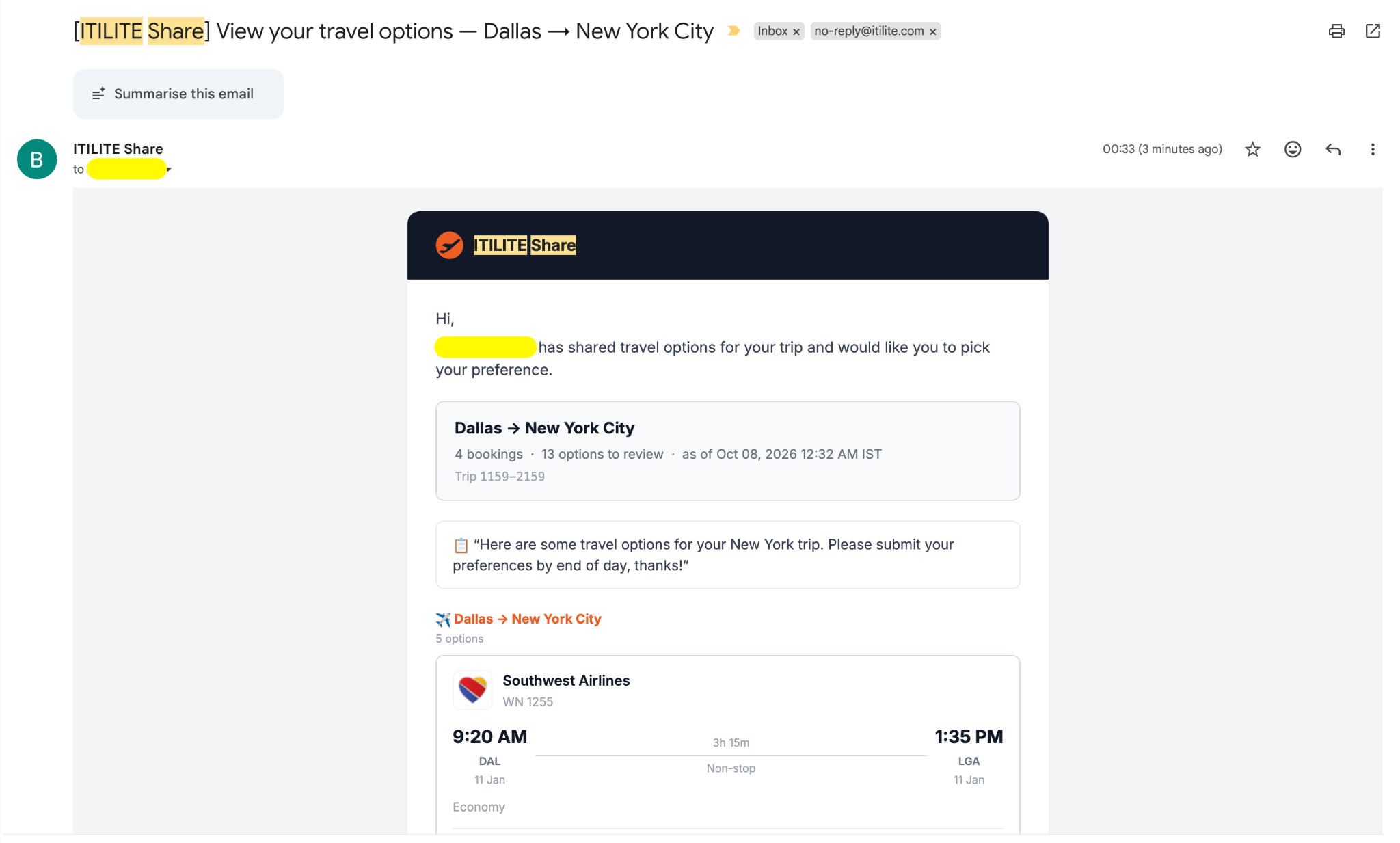
The email shows the trip, the number of bookings and options, and the time prices were captured. They open it with no login.
Alt text: ITILITE Share email showing a Dallas to New York City trip with 4 bookings, 13 options to review and the travel bookers’s note
4. The traveler picks and submits
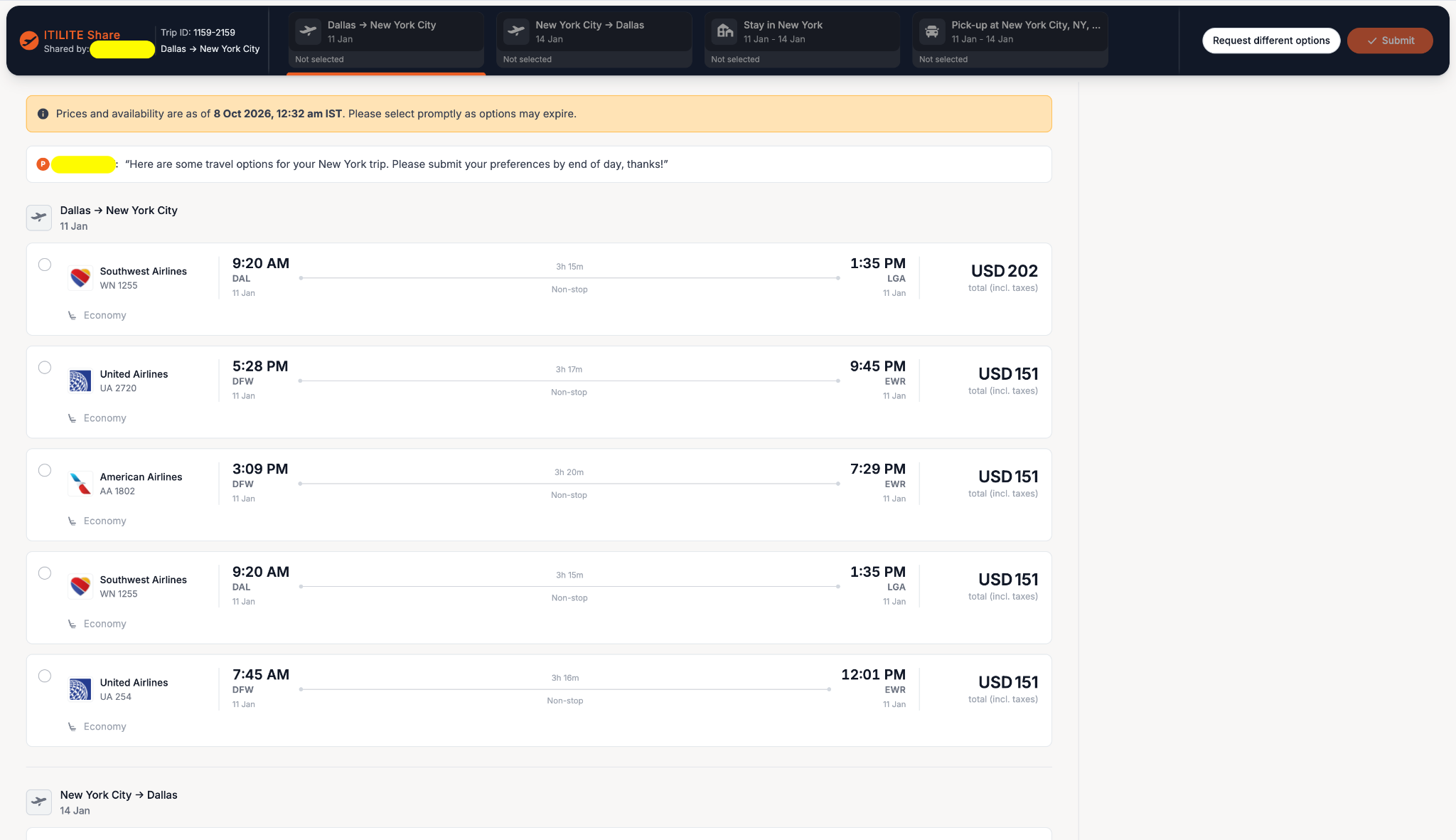
They choose one option per leg, add notes, and submit. If nothing works, they click Request different options.
Alt text: ITILITE Share page where a traveler selects one flight per leg, with Request different options and Submit buttons at the top
5. Book their choice
You get an email with their selections and notes. Click Complete booking on ITILITE to open the trip’s results page and book.
Part of a Bigger Shift in How Travel Gets Booked
This is one piece of a broader move to take the back and forth out of booking. The traveler’s preference used to live by email and chat, away from the trip. It now sits with the options and the booking, so the travel bookers share, collect and book in one flow.
Who Should Care About This
- Travel arrangers and executive assistants who book flights, hotels and cars for colleagues and leaders every week
- Companies that book for guests, candidates or contractors who have no ITILITE account
- Travel managers who want traveler preferences recorded against the trip, not scattered across inboxes
- Teams where fare changes make slow replies expensive, and speed decides whether you get the best option
Where This Goes
The pattern here is moving the traveler’s input into the booking flow instead of around it. Expect more of ITILITE’s travel bookers workflows to work the same way: preferences, options and bookings living on the same trip.
Explore the guest and candidate booking feature HERE.
Anish Khadiya co-founded ITILITE in 2017 after spending nearly a decade building the strategic and operational instincts that now shape how the company goes to market.
Before ITILITE, Anish was an Engagement Manager at McKinsey & Company. He experienced firsthand how inefficient corporate travel management was — not just as a traveler, but as a consultant helping organizations identify exactly where their operational costs were leaking. He later served as Director of Strategy & Planning at Myntra, before joining Mayank to build ITILITE from the ground up.
At ITILITE, Anish leads the business side , from revenue and partnerships to customer success. Anish holds a B.Tech (Hons) from IIT Kharagpur and a PGDM from IIM Lucknow.
Anish is ITILITE's go-to voice on the future of corporate travel and expense management, you'll find him on podcasts and webinars speaking about AI, spend visibility, and what modern T&E looks like for construction, manufacturing, healthcare staffing, and IT companies.
Book travel for guests without the back-and-forth
A fully integrated corporate travel management software that dramatically reduces spends while improving user experience