How Access Delegation Works?

Access Delegation in ITILITE allows you to grant another employee the ability to act on your behalf within the ITILITE Travel web platform. This guide explains how to manage delegation access and what to expect when using this feature.
Step-by-Step Guide
Follow these steps to give or remove delegation access.
Giving Access Delegation
- From any page, click your Profile Avatar Menu (usually in the top right corner) and select My Profile from the dropdown menu.
- On your profile page, scroll down to the Access Delegation section.
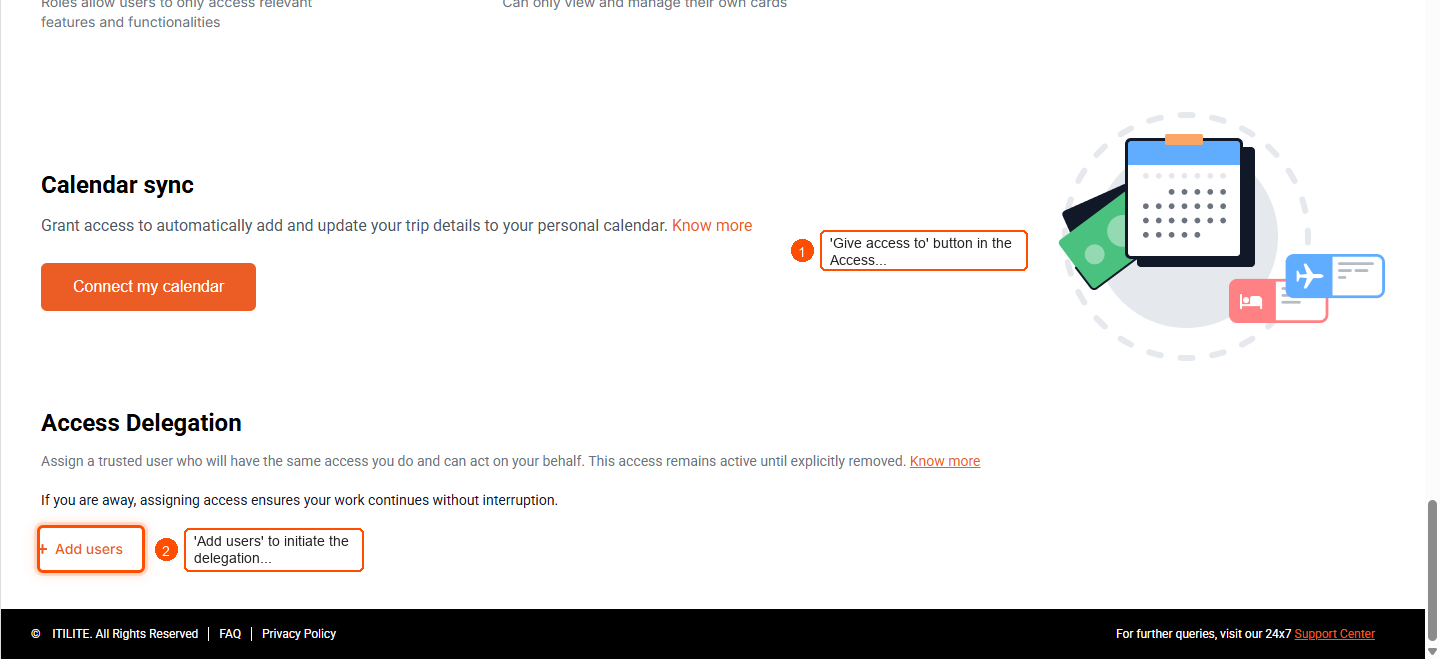
- Click the Give access to button.
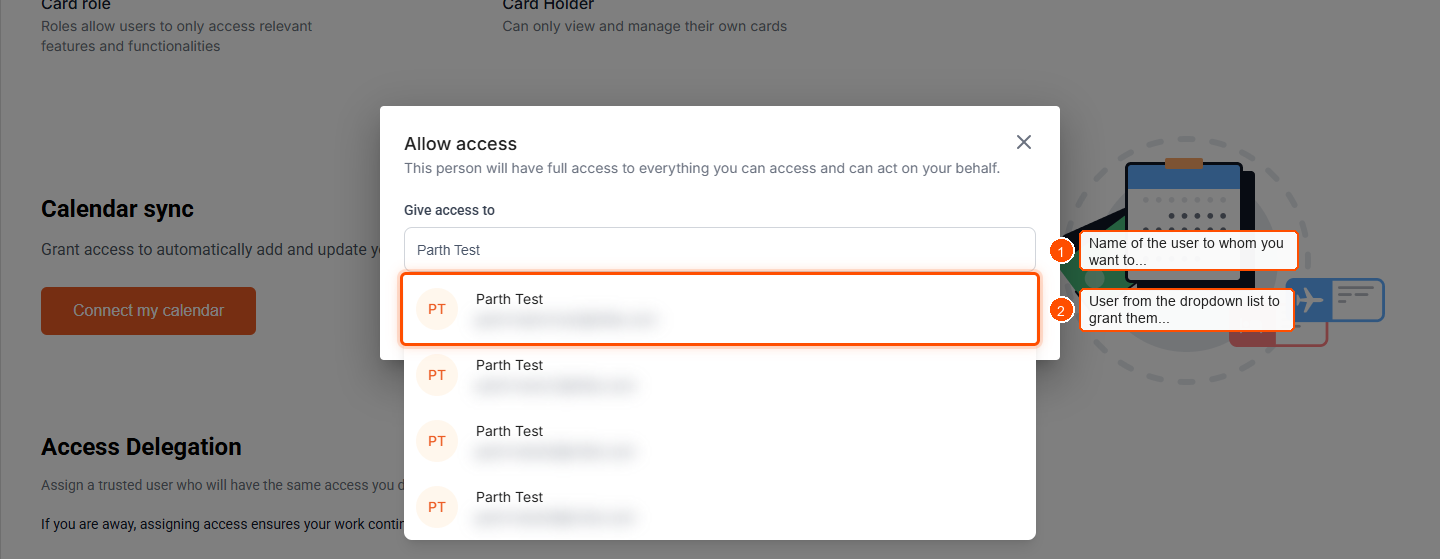
- In the search field, type the name of the employee you wish to delegate access to (e.g., "Parth Test") and select them from the dropdown list.
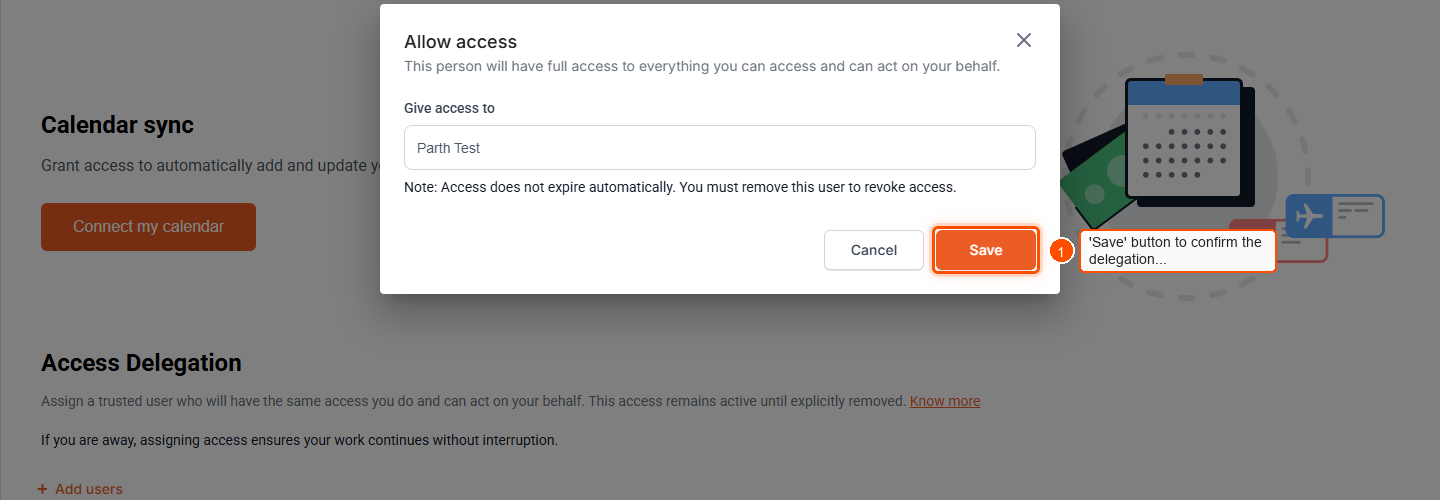
- Click the Save button to confirm the delegation. A toast notification will confirm that access has been delegated successfully, and the user will appear in your Access Delegation list.
Removing Access Delegation
- Go to your My Profile page and navigate to the Access Delegation section.
- Next to the user whose access you wish to revoke, click the Remove access button.
- Confirm your choice. The delegate will be notified, and their access will be removed immediately. If they are in an active delegated session, their next action will log them out.
Pro-Tips & Guardrails
NOTE: Delegation access is exclusively available on the ITILITE Travel web platform. It does not apply to the mobile app.
PRO-TIP: When acting as a delegate, you will always see a clear banner indicating whose behalf you are acting on. All actions performed in delegation mode are logged for audit purposes, ensuring full traceability.
NOTE: Delegation can only be granted to active employees within your company. You cannot delegate access to yourself or to guest users.
PRO-TIP: If your organization disables the delegation feature, all existing delegation access will be paused. If the feature is re-enabled, delegation access can resume without data loss.
Verification & FAQs
After granting access, verify that the delegate's name appears in your Access Delegation list. The delegate can then confirm their ability to "Act As" you via their profile icon.
Q: What is Access Delegation?
A: Access Delegation allows you to give another trusted user the same access you have in the ITILITE Travel web platform, enabling them to act on your behalf.
Q: What can someone do with delegation access?
A: A user with delegation access can access everything you can, perform actions on your behalf (e.g., create or manage bookings), and see and manage information you normally have access to.
Q: How long does delegation access last?
A: Delegation access does not expire automatically. It remains active until you manually remove it from your profile.
Q: How will I know if I am acting on behalf of someone else?
A: When you are using delegation access, you will see a clear banner indicating whose behalf you are acting on. You can also click your profile icon and select "Act as" the other user. To switch back, click your profile icon and select "Switch back to my account" from the Travel Dashboard, or simply log out and log back in.
Q: Can someone with delegation access give access to someone else?
A: No, a user with delegation access cannot pass it on to another person. Delegation cannot be chained or nested.
Ready to take your Travel Management to next level
A fully integrated corporate travel management software that dramatically reduces spends while improving user experience