“Our billing period is every three weeks. I have encountered employees who would no longer present expenses due to the belief that it is not worth the trouble.” When a finance manager made that comment on Reddit, it received no pushback. Everyone in the thread had witnessed the same thing.
When processing is slow and the status of a claim is anyone’s guess, employees lose trust in the system. Some stop submitting small expenses altogether. Others batch everything at month end, which creates a different kind of chaos for finance.
Processing expense reports isn’t complicated in theory. In practice, it breaks down at the same places every time. This guide walks through each step, the common failure points, and what good looks like.
What does processing an expense report actually involve?
It’s not just reviewing a receipt and clicking approve. The full cycle looks like this:
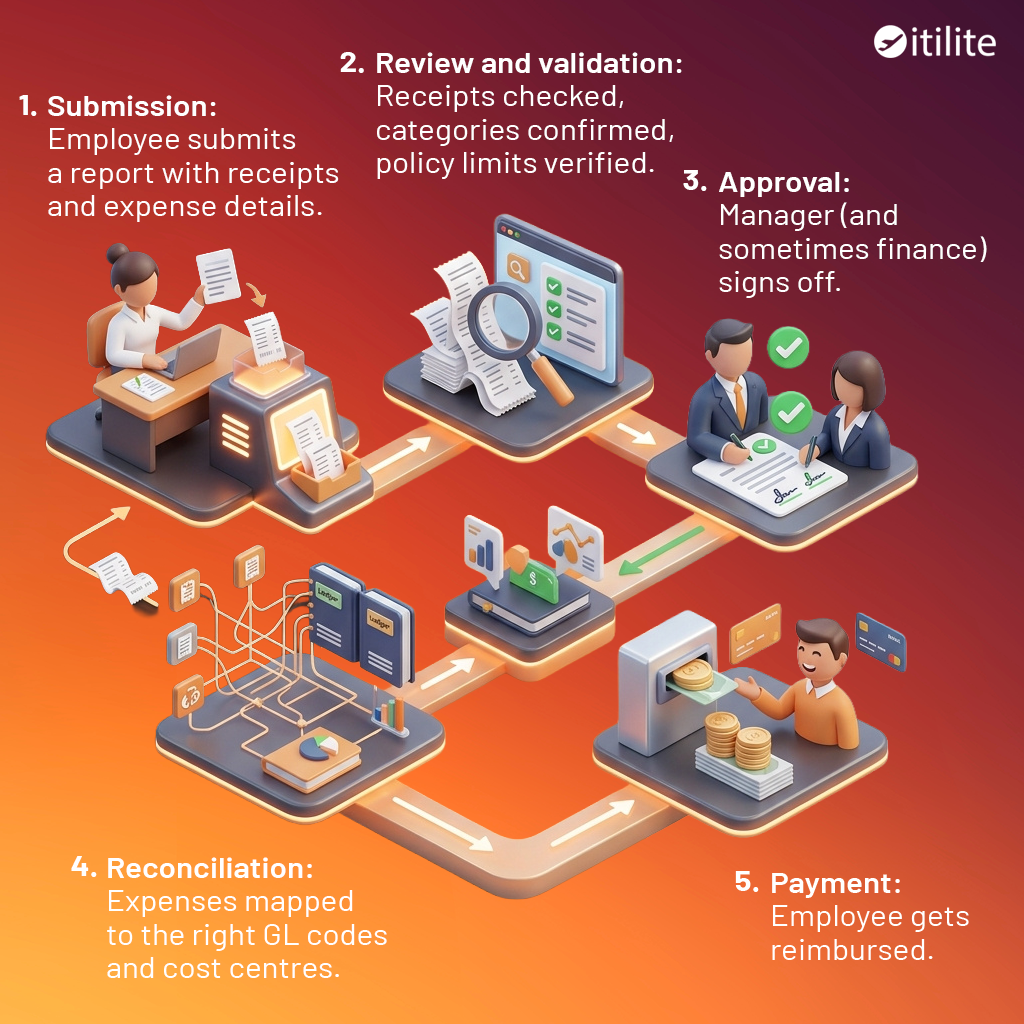
Every step has a potential hold-up. And when hold-ups stack, a two-day process quietly becomes a three-week one.
Step 1: Submission
The quality of what comes in determines how much work happens downstream. If employees are submitting on email threads or personal spreadsheets, expect inconsistency. Every submission will look different, and finance ends up reformatting before they can even start reviewing.
A standardised submission format, whether through a form or expense software, should capture a few non-negotiables:
- Date and amount
- Expense category
- Business purpose
- Receipt attached
That last one causes the most friction. Receipts get lost, come in as blurry photos, or get skipped entirely on smaller purchases. Part of the fix is policy: establish a clear receipt threshold (many companies use $25) and communicate it. The other part is tooling. Platforms like ITILITE let employees capture and submit receipts directly from their phone the moment a purchase happens, before the receipt is crumpled in a pocket or forgotten in a hotel room. ITILITE’s OCR receipt scanner automatically reads and extracts the amount, date, merchant name, and expense category from the receipt image, so the employee isn’t manually typing anything, the data lands in the right fields from the start, and finance isn’t squinting at a blurry image trying to reconcile numbers.
Step 2: Review and Validation
Once a report lands with finance, the review covers four things:
- Does the receipt match the claimed amount?
- Is the category correct?
- Is there a clear business purpose stated?
- Does it fall within policy limits?
According to the American Express 2023 Expense Management Trendex, six in ten business travellers say submitting expenses is their least favourite part of business travel.
A big reason is the back-and-forth that comes from unclear requirements. When validation criteria are documented and communicated upfront, employees submit correctly more often, and finance spends less time sending reports back.
One thing worth flagging: credit card statements are not receipts. A statement shows a total. An itemised receipt shows what was bought. For audit purposes, you need the latter. When expense software automatically extracts line-item data from receipts at the point of capture, this distinction stops being a problem, the itemised detail is already there by the time finance sees it.
Step 3: Approval Workflow
Most approval delays come down to one thing: nobody defined who approves what, or how fast they need to do it.
A basic workflow looks like this:
- Employee submits
- Direct manager approves (legitimacy check)
- Finance reviews (policy and coding check)
- Payment processed
Where it gets complicated is thresholds and escalation. Expenses above a certain amount should require a second level of sign-off. Out-of-policy expenses should route to finance automatically, not get quietly passed through by a manager who doesn’t want the conversation.
Set an SLA for each approval stage. Five business days is a common benchmark for manager review. When there’s no timeline, reports sit in inboxes and nobody’s technically at fault for the delay, but the employee waiting on $400 in reimbursements doesn’t see it that way.
Mobile approval matters here too. Managers who travel can become approval bottlenecks if the only way to sign off is through a desktop system. ITILITE’s mobile approval means a manager can review and approve from anywhere, so a week-long business trip doesn’t quietly hold up reimbursements for the entire team.
Step 4: Reconciliation
Once approved, expenses need to map to the correct general ledger codes, cost centres, and project codes before anything gets paid. This is where expense data feeds into the accounting system, and errors here create problems at month-end close.
Common issues:
- Employees choose the wrong category, so expenses land in the wrong GL code
- Project codes get left blank, making cost tracking impossible
- Duplicate submissions slip through because there’s no automated check
Duplicate submissions are more common than most finance teams expect. Without a systematic review, the same expense can get paid twice, particularly when employees submit from different channels or across reporting periods. ITILITE flags potential duplicates automatically by matching amount, date, and vendor, so they get caught before payment goes out rather than during a reconciliation audit three weeks later.
Step 5: Reimbursement
Once a report is approved and reconciled, payment should go out within a defined window. Most companies aim for five to seven business days post-approval. Some manage it faster.
The method matters. Bank transfers (ACH) are quicker and produce a cleaner audit trail compared to cheques. Payroll-cycle reimbursements can work for predictable expenses but create long queues when someone submits mid-cycle.
Whatever the method, employees should be able to track the status of their claim without having to email someone. ITILITE gives employees real-time visibility into where their report sits, submitted, under review, approved, paid. That single change cuts a significant share of the “just checking on my expense report” messages that finance fields every week.
Where Processing Usually Breaks Down
The same problems show up across finance teams. Here’s what causes the most damage:
1. Missing or invalid receipts.
The number one reason reports get returned. A clear receipt policy helps, define what’s acceptable (itemised receipt, not a card statement), set a minimum threshold, and specify what happens when a receipt is genuinely unavailable. Mobile capture at point of purchase, the way ITILITE handles it, eliminates most of this before it reaches finance.
2. Wrong expense categories.
When employees pick from a long list, they guess, and they guess differently from each other. Limiting the category list and providing examples of what goes where reduces miscoding significantly. Automated category suggestions based on vendor type reduce it further.
3. Approver unavailability.
A manager on leave with no delegated authority stops the entire approval chain. Set up delegation rules before it becomes an issue. Systems that support automatic reassignment when an approver is out remove this as a recurring problem.
4. Late submissions.
Employees who batch expenses at month-end create a workload spike for finance right when books need to close. Encourage weekly or real-time submission. Some companies make it a policy requirement; others use reminders built into their expense tool.
5. Duplicate submissions.
Happens most often when employees aren’t sure whether a previous report went through. Status visibility and submission confirmation solve most of this on the employee side. Automated duplicate detection, matching vendor, amount, and date, catches the rest.
Best Practices for Getting Approvals Right
Approvals work when the rules are clear, the tools are accessible, and timelines are set.
A few practical things that help:
- Set SLAs and make them visible: “Approve within 5 business days” is actionable. “Approve promptly” is not. When approvers can see which reports they’re sitting on, and for how long, response times improve without anyone having to chase.
- Enable mobile approvals: A manager travelling for the week shouldn’t be a bottleneck. If your current system requires a desktop to approve, that’s a structural delay waiting to happen.
- Auto-approve low-value in-policy claims: Not every $14 coffee needs a human decision. ITILITE can automatically approve expenses that fall clearly within policy, freeing managers to focus on the claims that actually require judgment, and speeding up reimbursement for the routine ones.
- Make the data visible: When finance can see which approvers are consistently slow, conversations can happen. Without that visibility, the delay is invisible and nothing changes.
Conclusion:
Processing expense reports doesn’t have to be a source of constant friction between finance and employees. The high costs and errors are rarely the result of bad intent.They usually stem from broken workflows, missing receipts, and unclear timelines.
Using deadlines to establish solid SLAs, ease the selection of categories, and shift towards approvals that are mobile-friendly, you will be able a smooth predictable cycle. Trust is regained when the process is clear. Finance gets clean data, and employees can focus on their work rather than worrying about their bank balances.
The goal isn’t just to pay people back; it is to build a system where the “worth the trouble” debate never happens in the first place.