
Corporate Travel Budget Alert
Get instant notifications when spending nears or exceeds limits, view real-time utilization, and make policy enforcement effortless across flights, hotels, and ground bookings.
Trusted by 500+ companies






Budget Control That Happens When It Should
Most organizations find out about overspending after a trip is done. At that point, it’s too late.
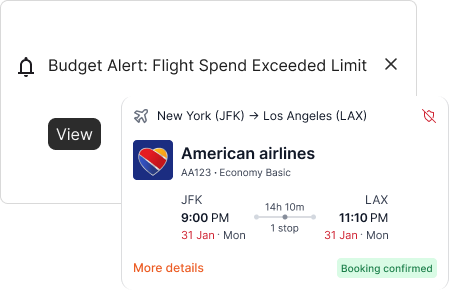
With Business Travel Budget Alert, Itilite monitors spend at the point of action, when employees book travel or file an expense.
If a booking exceeds a limit, the system instantly notifies the traveler and the approver, helping you correct overspending before it becomes a reimbursement issue.
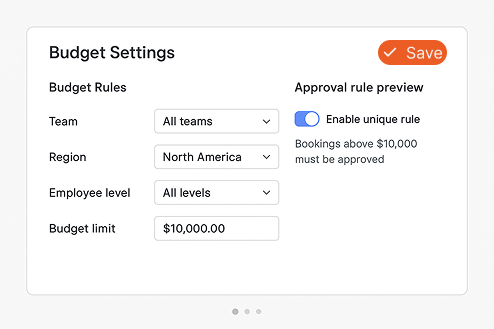
Configurable for Every Business Structure
Budgets in corporate travel aren’t one-size-fits-all.
Itilite lets you define budgets the same way your business operates, by department, region, employee level, or project.
You can:
- Create unique rules for teams or cost centers.
- Adjust limits for regions or trip types.
- Align policies to local costs or vendor contracts.
This makes Corporate Travel Budget Alert management simple and effective for global organizations.
Proactive Alerts, Not Just Notifications
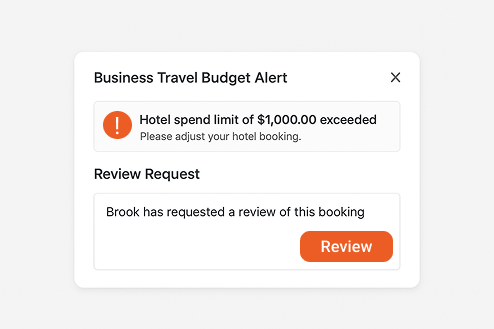
Once a Business Travel Budget Alert triggers, Itilite takes action.
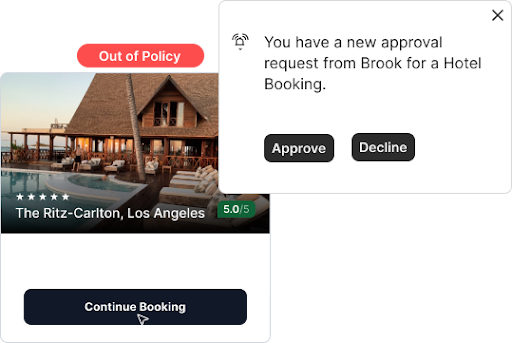
Travelers see an in-app message explaining the limit. Approvers get a notification to review or comment.
The system can either block the transaction until approval or let it proceed with justification, depending on how you set policy strictness.
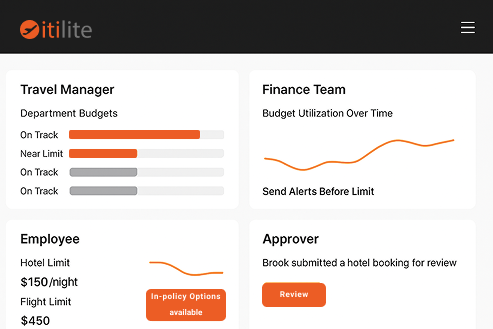
Visibility for Every Role
Each stakeholder gets tailored visibility:
- Travel Managers: See departmental budgets in real time and forecast costs accurately.
- Finance Teams: Track utilization and set alerts before limits are hit.
- Employees: Understand what’s allowed before booking.
- Approvers: Manage alerts directly in their dashboard or email.
The result is clarity for everyone involved in business travel spending.
Corporate Travel Budget Alert visibility ensures that no one is caught off guard by policy limits.
Works Seamlessly for Global Teams
Corporate budgets look different in every region.
Itilite’s Business Travel Budget Alert adapts automatically, with multi-currency support, localized limits, and real-time conversion.
Global travel programs stay unified without forcing everyone into a single rule set.
That makes Corporate Travel Budget Alert tools within Itilite ideal for multinational teams.
Understanding Business Travel Budget Alerts: How They Help You Prevent Overspending
Learn what Business Travel Budget Alerts are, why companies use them, and how they improve cost control in modern travel programs.
What Is a Business Travel Budget Alert?
A Business Travel Budget Alert is a rule-based notification that monitors employee travel spending in real time.
When someone books a trip or files an expense that nears or exceeds a limit, Itilite automatically alerts the right people, traveler, approver, or finance, based on your policy.
Instead of waiting for expense reports to reveal overages, companies know the moment spending goes off track.
Why Do Companies Need Business Travel Budget Alert?
In most companies, budgets are approved but not actively tracked.
Travelers book, receipts pile up, and finance learns about overspending weeks later.
That delay not only drives up costs, it also reduces accountability and compliance.
Business Travel Budget Alert solves this by creating real-time guardrails:
- Travelers see what’s allowed before confirming bookings.
- Approvers get notified only when intervention is needed.
- Finance gets visibility without chasing reports.
It’s not about restricting travel, it’s about empowering better decisions instantly.
This makes Corporate Travel Budget Alert systems a must-have for growing organizations.
How Do Budget Alerts Work in Itilite?
Here’s what happens behind the scenes when you use Itilite:
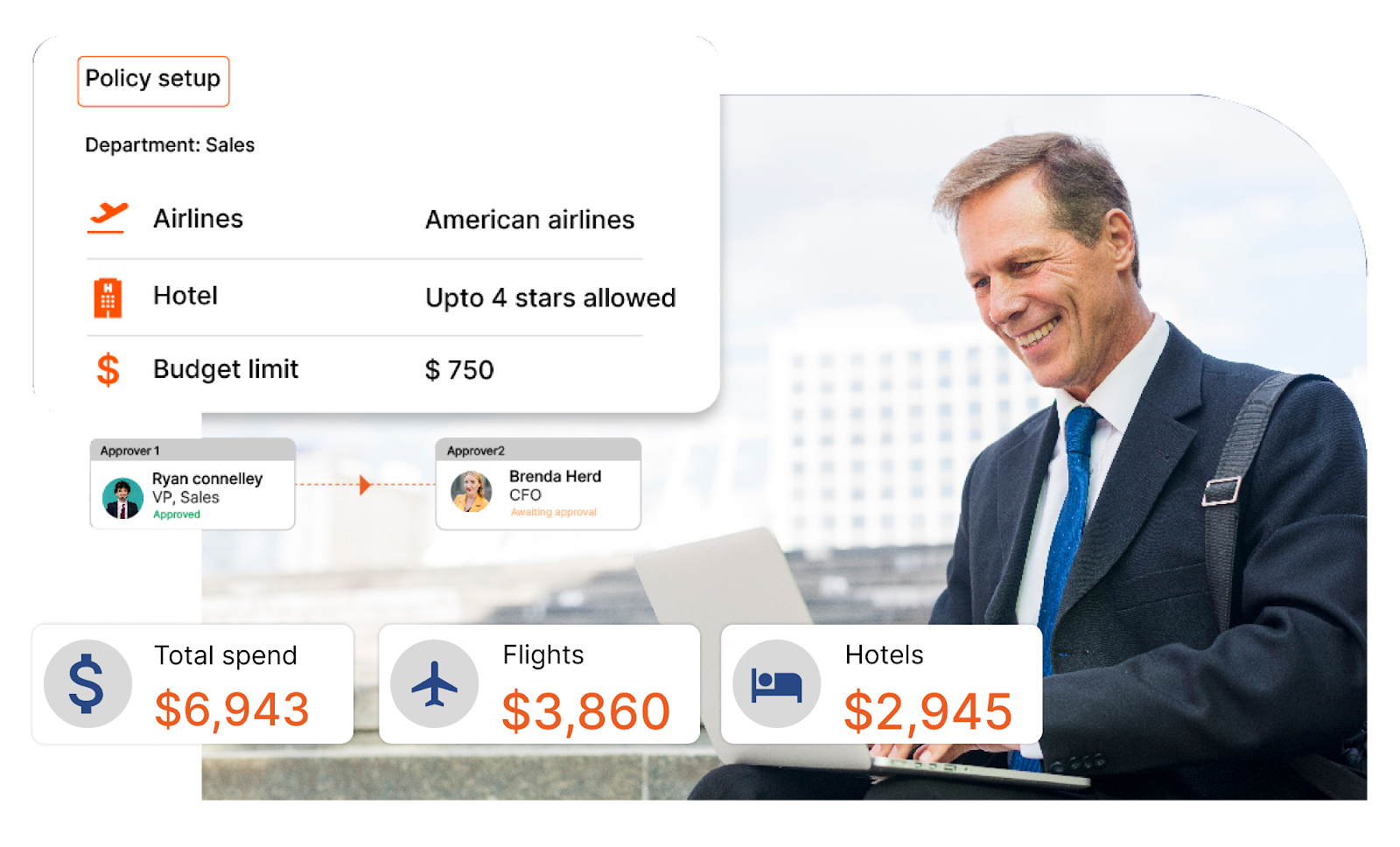
- Policy Setup: You define how budgets work, by department, employee level, trip type, or destination.
- Live Monitoring: As soon as someone starts booking, Itilite checks the cost against that rule.
- Trigger: If the cost exceeds or nears a threshold, an alert is generated.
- Action: The traveler sees options, continues with justification, or switches to a compliant alternative.
- Visibility: Approvers and finance see the same data instantly in their dashboards.
All of this happens automatically, without manual checks.
That’s what makes Business Travel Budget Alert automation valuable to travel and finance teams.
What Kind of Overspending Triggers an Alert?
Itilite monitors both booking-level and cumulative spend. Examples include:
- A team booking flights that exceed its quarterly cap.
- A hotel stay that’s $50 above the company’s nightly allowance.
- A traveler selecting a non-preferred airline when a cheaper option is available.
- A department nearing its 90% budget threshold for the month.
Alerts can be customized to notify at different percentages, such as 80%, 90%, or 100%, depending on your control preference.
Corporate Travel Budget Alert flexibility ensures you stay informed without micromanagement.
How Are Budget Alerts Different from Expense Reports?
Expense reports show what has happened.
Business Travel Budget Alert shows what is about to happen.
They turn your travel program from reactive (review after reimbursement) to preventive (fix before booking).
This helps organizations cut down on unapproved travel spend, improve compliance, and reduce end-of-month surprises for finance teams.
How Does Itilite Make This Easier for Users?
Itilite embeds Business Travel Budget Alert directly into the travel booking and expense flow, with no extra tools or spreadsheets.
Travelers get in-platform messages. Approvers and finance get notifications on Slack, email, or dashboard.
You don’t need to monitor anything manually; Itilite does it for you.
Frequently Asked Questions
How specific can I get with budget alerts in Itilite?
You can define budgets by department, project, employee level, region, or travel category (flights, hotels, car rentals, meals). Each rule connects automatically to the company’s policy.
Can I define multiple currencies or localized limits?
Yes. Itilite supports multi-currency travel budgets and automatically converts expenses into your base currency in real time.
What happens when an alert triggers?
The traveler receives an instant notification with policy-compliant alternatives. Approvers and finance teams get corresponding alerts, which they can approve or reject directly.
Can I decide whether to block bookings that exceed the budget?
Yes. You can configure soft-blocks (warnings) or hard-blocks (booking restrictions) based on department or role.
Who receives the alert when budgets are exceeded?
It depends on your workflow setup. Typically, the traveler, immediate manager, and finance team receive notifications.
Can I track utilization percentages over time?
Yes. Itilite provides a real-time utilization dashboard where you can see budget use by department, month, or project, including alert history and trendlines.
Does Itilite log who approved or overrode a budget alert?
Yes. Every alert is recorded with timestamp, user ID, action taken, and reason, ensuring full traceability for audit purposes.
Can we integrate these alerts with reporting tools?
All alerts and budget data feed into Itilite’s analytics dashboard. You can export or connect via APIs to BI tools like Power BI or Tableau.
What if exchange rates fluctuate during travel?
Itilite’s real-time conversion engine updates currency values instantly, so alerts reflect accurate spend at the time of booking.
How does this feature improve compliance rates?
By informing travelers at booking time, Itilite reduces out-of-policy submissions by up to 30–40%. Employees know instantly when they’re near or over budget, minimizing rejection cycles.